
CLO Virtual Fashion has shipped Marvelous Designer 2026.1, and the headline additions are aimed squarely at character artists rather than fashion designers: you can now paint wrinkles into fabric by hand, and tear garments apart along their stitching.
For anyone building game or film characters, that second one is the interesting part. Convincing damaged clothing has always been fiddly to fake.
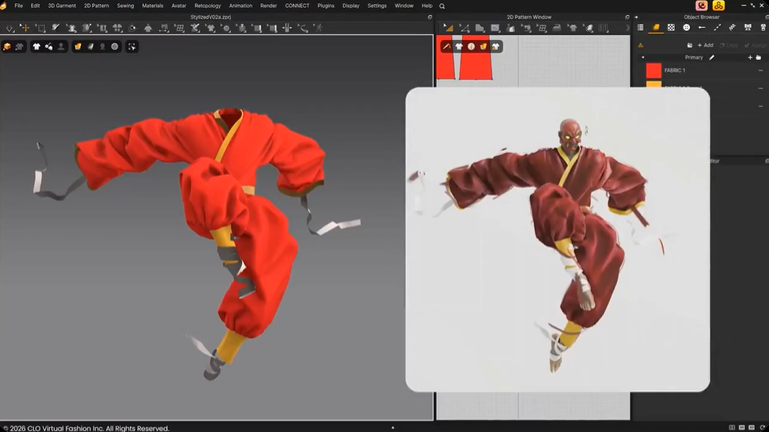
Painting Folds Directly Onto Fabric
The Pinching tool gains a Brush Pinching mode, letting you create folds and wrinkles freehand by painting onto the garment surface rather than relying purely on simulation to produce them.
Alongside it is an option to temporarily override the fabric simulation while pinching, so wrinkles hold their shape instead of being immediately resolved away by the solver. In practice this is art direction over physics — useful when a director wants a specific fold and the sim keeps disagreeing.
Tearing Clothes Along the Seams
The new Seamline Rip tool, still flagged experimental, pulls a garment apart along its stitching lines and generates fraying on the torn edges automatically.
This is one of those features that sounds niche until you need it. Battle damage, post-apocalyptic wardrobe, creature transformations, horror — all of it currently gets solved with sculpting, alphas and patience. Generating it from the garment’s own seam data is a considerably shorter route.
Blendshape Recording for Avatars
Marvelous Designer can now record changes in blendshape values on the 3D avatar, which opens the door to keyframing facial animation or corrective morphs on the character the clothing is being fitted to. For anyone whose garments need to hold up across expression changes, this closes a real workflow gap.
Smaller Changes Worth Knowing
- Apple Silicon users get Metal-based GPU simulation, which should mean a meaningful speed-up on current Macs
- Camera data can now be imported and exported through FBX and glTF/GLB
- Original UVs can be preserved when importing OBJ files as garments
- The 3D Pencil and Lacing tools from 2026.0 both get refinements, along with zipper placement and pattern mirroring
- Toolbars in the 2D and 3D views are now customisable, and the Windows edition adds a global search
The Price Problem
Marvelous Designer remains subscription-only, with no perpetual licence. Personal plans run about $39 a month or $280 a year on Windows and macOS. Enterprise pricing sits near $199 a month or $2,000 a year, rising to roughly $2,300 a year if you need the Linux edition. Indie plans exist for small studios under a revenue threshold, but the company does not publish their cost.
Supported platforms are Windows 11, macOS 14.0 or later, and RHEL/Rocky Linux 9.5 or later.
For a hobbyist, $280 a year for clothing simulation alone is a hard sell — that is roughly what a full Substance subscription costs, and Blender is free. For a working character artist producing garments regularly, it remains the fastest path from 2D pattern to simulated 3D clothing, and it exports to Alembic, FBX, USD, OBJ sequences and Maya cache formats.
The Free Alternative Question
Blender’s built-in cloth simulation handles draping and basic garment behaviour perfectly well, and free tools like Bystedt Cloth add helpful workflow layers on top. What Blender does not give you is pattern-based construction — designing clothing as flat panels that get stitched together, the way real garments are made.
That distinction is the whole reason Marvelous Designer survives at this price. If you are simulating a cape, Blender is fine. If you are constructing a tailored jacket that needs to read correctly from every angle, pattern-based tools are a different category of work.
Browse free cloth and rigging tools in the 3DxDEV Library, or see our full resources directory for more character-art tooling.

