RetopoFlow is one of the most popular retopology toolkits for Blender, designed to make the tedious job of building clean, animation-ready topology fast and even enjoyable. If you sculpt high-detail models and need a usable low-poly mesh for animation, games, or rendering, RetopoFlow gives you a dedicated set of tools built specifically for retopology. Here is everything you need to know about RetopoFlow 4.
What Is RetopoFlow?
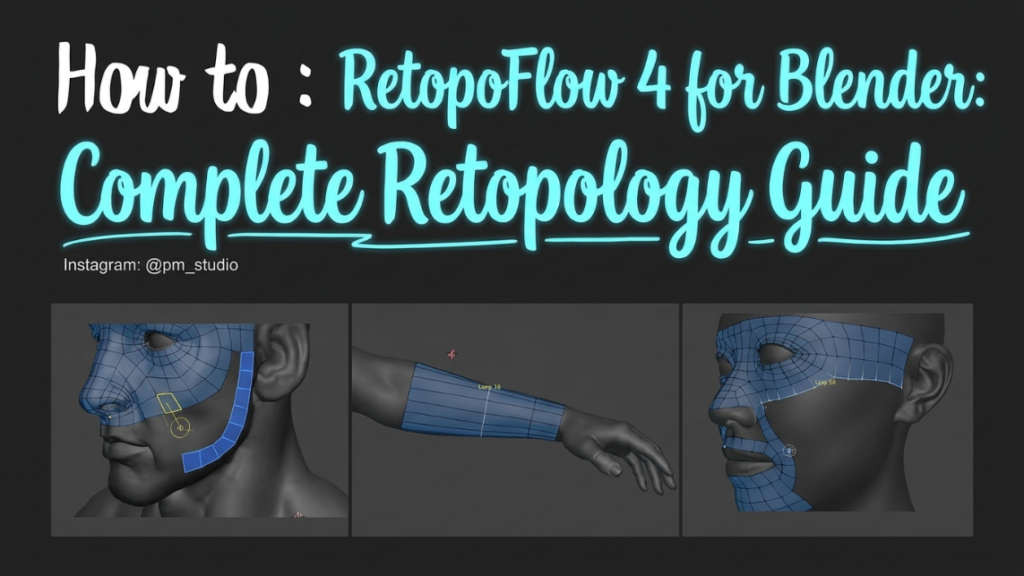
RetopoFlow is a suite of retopology tools that live inside Blender, developed by CG Cookie. Retopology is the process of creating a new, cleaner mesh on top of a high-resolution sculpt. Instead of using Blender’s general modeling tools, RetopoFlow provides purpose-built brushes and modes that snap new geometry directly to your reference surface, making it far quicker to lay down efficient edge flow.
Key RetopoFlow Tools
- Contours – draw perpendicular strokes to quickly retopologize cylindrical shapes like arms and legs.
- PolyStrips – block out large areas with strips of quads.
- Strokes – draw individual edge loops and patches.
- PolyPen – place vertices and faces precisely for detailed areas.
- Relax, Tweak, and Patches – refine and clean up your mesh with ease.
Why Use RetopoFlow Instead of Manual Retopology?
You can retopologize by hand using Blender’s snapping and the Shrinkwrap modifier, but it is slow and fiddly. RetopoFlow speeds this up dramatically with automatic surface snapping, symmetry, and dedicated brushes that let you focus on edge flow rather than technical setup. For character artists and anyone doing high-to-low workflows, it can save hours per model.
Is RetopoFlow 4 Free to Download?
RetopoFlow is a commercial addon sold on Blender Market and through CG Cookie. Some versions have been open-sourced on GitHub over time, so it is worth checking the official repository to see what is freely available. However, be wary of unofficial “free download” or “crack” sites, which are often outdated and risky. Purchasing from the official source ensures you get the latest version and support ongoing development.
How to Get Started with RetopoFlow
- Install the RetopoFlow .zip through Edit > Preferences > Add-ons > Install.
- Select your high-poly sculpt as the reference surface.
- Create a new mesh and enter RetopoFlow.
- Use Contours and PolyStrips to block out major forms, then refine with PolyPen and Relax.
Final Thoughts
RetopoFlow 4 turns one of the least enjoyable parts of 3D modeling into a smooth, guided process. If clean topology matters for your animation, game, or rendering pipeline, it is a worthwhile investment. Want more Blender workflows? Learn the essentials of mesh editing in our guide to merging objects in Blender, or generate animation-ready characters fast with the Human Generator addon.