Learning how to merge objects in Blender is one of the most useful skills for any 3D artist. Whether you are combining parts of a model, joining meshes for export, or cleaning up a scene, Blender gives you several ways to merge objects depending on the result you need. In this tutorial we cover four reliable methods: Join, Boolean Union, merging vertices, and merging by distance.
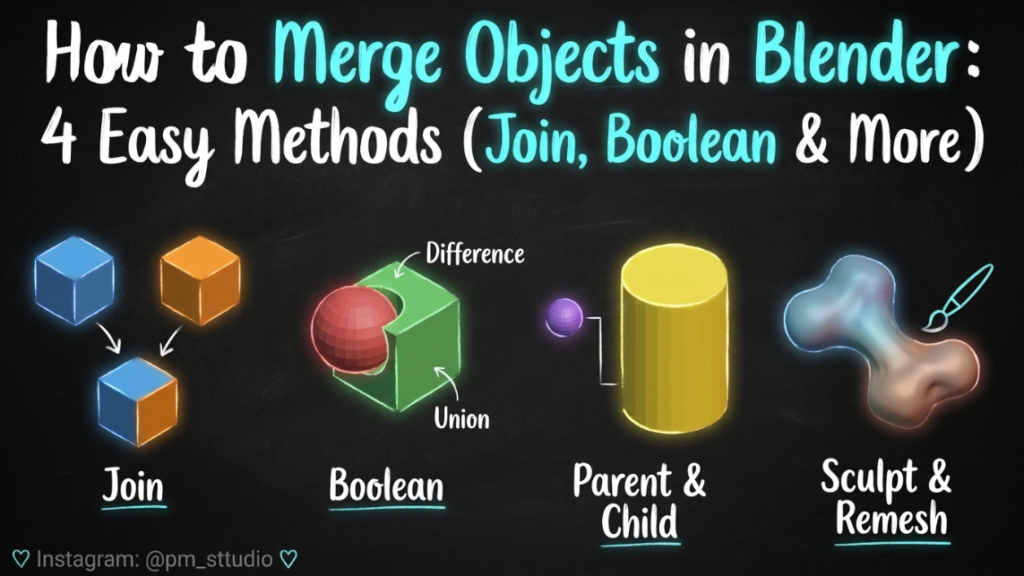
Method 1: Join Objects (Ctrl + J)
The fastest way to combine objects is the Join command. It merges multiple objects into a single object while keeping their separate geometry intact.
- In Object Mode, select all the objects you want to combine.
- Make sure the object you want to keep as the “parent” is selected last (it becomes the active object).
- Press Ctrl + J, or go to Object > Join.
All selected objects are now one object. Note that this does not weld the meshes together; the geometry is simply contained in one object.
Method 2: Boolean Union (Truly Fuse Meshes)
If you want two overlapping objects to become one seamless, watertight mesh, use a Boolean modifier set to Union.
- Select the main object and add a Boolean modifier from the modifier panel.
- Set the operation to Union.
- Choose the second object as the target.
- Apply the modifier, then delete the second object.
This is ideal for hard-surface modeling and 3D printing, where you need a single solid mesh.
Method 3: Merge Vertices (Edit Mode)
To weld individual vertices together after joining, use the Merge tool in Edit Mode.
- Enter Edit Mode (Tab) and select the vertices you want to merge.
- Press M to open the Merge menu.
- Choose At Center, At Cursor, or At Last depending on where you want the merged point.
Method 4: Merge by Distance (Remove Doubles)
When two joined meshes share overlapping vertices, Merge by Distance welds them automatically.
- In Edit Mode, select all vertices with A.
- Press M and choose By Distance.
- Adjust the merge distance so only intended vertices combine.
Which Method Should You Use?
- Use Join (Ctrl + J) to group objects into one for organization or export.
- Use Boolean Union to fuse overlapping shapes into a solid mesh.
- Use Merge Vertices or By Distance to weld geometry and remove duplicates.
Final Thoughts
Merging objects in Blender is simple once you know which tool fits your goal. Join for quick grouping, Boolean for solid fusion, and Merge for clean welded geometry. For more Blender skills, learn how to build clean topology with our RetopoFlow 4 retopology guide, or speed up your environments with the Botaniq vegetation addon.