
AutoRemesher is a free, standalone auto-retopology tool that converts high-polygon meshes — sculpts, 3D scans, kitbashes, AI-generated meshes — into clean quad topology. It is written by Jeremy Hu, the developer behind Dust3D, and sits at over 3,000 GitHub stars.
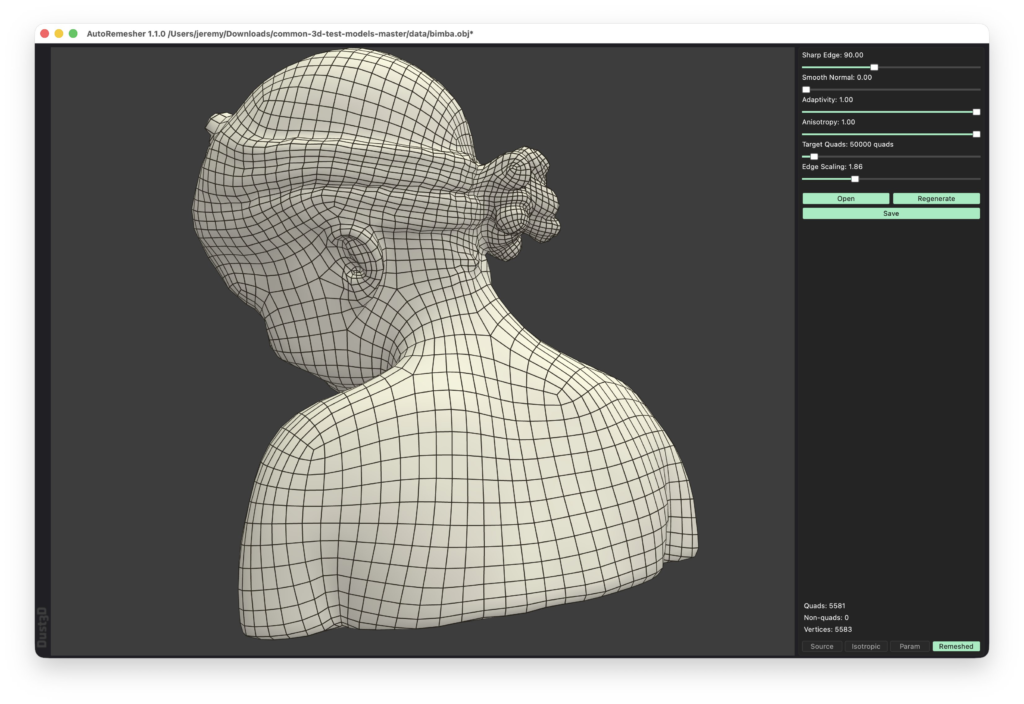
The important thing about it: since version 1.0 it is MIT licensed. The author reimplemented the MIT-incompatible dependencies specifically so the tool could be used freely in commercial projects. That is a meaningfully different proposition from most open-source geometry tools, which tend to be GPL.
What Is New in 1.1.0
Released in August 2026, this update rebuilds a significant part of the pipeline:
- Geogram replaced with a native quad parameterizer — the external dependency is gone, and UV parameterization and quad extraction are both improved as a result
- Anisotropic quad sizing, exposed through a new
--anisotropyCLI option, giving control over quad edge proportions - Extracted quads are now smoothed and projected back onto the input mesh, so the result hugs the original surface more faithfully
- Six-edge faces are split during quad extraction
- Pipeline previews — inspect the source, isotropic, parameterization and remeshed stages separately to see where a bad result went wrong
- Singular vertices and extracted connections are now visible in previews
- Non-manifold remeshing fixes — a recurring source of crashes on messy scan data
GUI and Command Line
AutoRemesher ships both a desktop application and a headless CLI, which makes it genuinely useful for batch work. The command line exposes target quads, edge scaling, sharp edge angle, smooth normal, adaptivity and now anisotropy, plus an optional report file.
If you are processing dozens of scanned or generated meshes, being able to script the retopology pass is worth more than any single quality improvement.
Using It With Blender
AutoRemesher is a standalone app, not an add-on — but the community has bridged it. Adrien Rouquié released an AutoRemesher Bridge for Blender shortly after 1.0, and there is a separate Blender extension build that runs remeshing in a separate process so a native crash becomes an error message instead of taking Blender down with it.
How It Compares
Instant Meshes is the other free standard and is generally more robust on degenerate or complex geometry, though its interface is dated. ZRemesher (inside ZBrush) and Quad Remesher still produce better edge flow on characters, and both cost money. AutoRemesher sits between them: better parameter control than Instant Meshes, free and MIT where the commercial tools are not.
Expect to do some manual cleanup regardless. No automatic remesher yet produces the deliberate edge loops a character artist would place by hand around a mouth or a shoulder.
Developer: Jeremy Hu (huxingyi) · Version: 1.1.0 · Licence: MIT · Platforms: Windows, macOS, Linux
See more free retopology tools in our retopology and modeling roundup.