
AutoRemesher is a free, cross-platform tool that converts dense meshes — 3D scans, sculpts, kitbashes, AI-generated models — into clean all-quad topology. It is developed by Jeremy Hu, the author of Dust3D, and released under the MIT licence, which means commercial use is fully permitted.
Version 1.1.0 landed in August 2026 and is a substantial technical release rather than a cosmetic one.
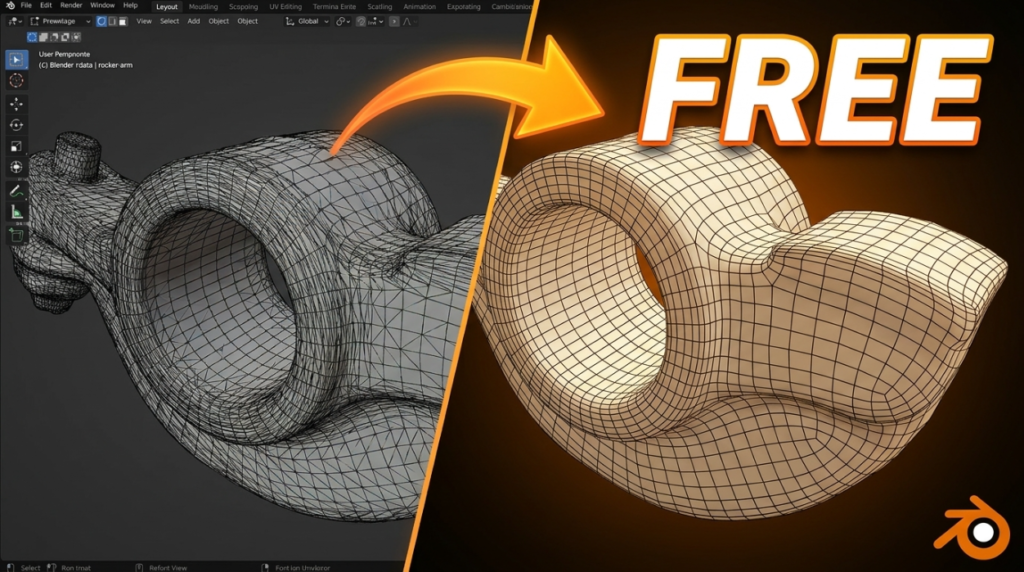
What Is New in 1.1
- A native quad parameterizer replaces Geogram — the core of how the quad layout is solved has been rewritten
- Anisotropic quad sizing, exposed through a new
--anisotropycommand-line option, so quads can stretch along flow rather than staying uniformly square - Improved UV parameterization and quad extraction
- Extracted quads are now smoothed and projected back onto the input mesh, which means less shrinkage and better silhouette fidelity
- Six-edge faces are split during extraction
- Non-manifold mesh remeshing is fixed — historically the most common reason retopology tools fail on scan data
- New previews for the source, isotropic, parameterization and remeshed stages, plus visualisation of singular vertices and extracted connections
That last one matters more than it sounds. Being able to see where singularities land lets you diagnose bad edge flow instead of guessing at parameters.
How It Compares
The honest positioning: this competes with ZBrush ZRemesher and Exoside Quad Remesher, both paid, and with Blender’s built-in QuadriFlow, which is free but frequently disappointing on organic forms.
User comparisons have reported better edge flow than QuadriFlow on organic models and noticeably fewer artefacts, with output quality approaching the commercial tools. It is slower than Instant Meshes, but global topology consistency holds up better. One user reported roughly 43 seconds on a 183,000-face model.
Using It with Blender
AutoRemesher is a standalone application, not a Blender add-on. There are two community bridges, neither official:
- The AutoRemesher Bridge by Adrien Rouquié, which exports a temporary OBJ from Blender, processes it and brings the result back
- A fork with a native Blender extension by Jake Blakeley, requiring Blender 5.1+ (with separate builds for 4.2 LTS to 5.0). It adds a DynaMesh-style Weld Shells preprocess, keeps islands that fail to quadrangulate as triangles instead of dropping them, and runs remeshing in a separate process so a crash cannot take Blender down
GUI and Command Line
You can drive it through the desktop interface or headless from the CLI, which makes batch retopology across an asset library practical. The main control is --target-quads, so you work to a polygon budget rather than a vague density slider, alongside adaptivity, sharp-edge angle, edge scaling, smooth normals and now anisotropy.
Binaries are available for Windows, macOS and Linux. Input is OBJ.
Worth Knowing
Retopology quality always depends on the source mesh. Test on copies, check for non-manifold geometry first, and inspect the output in your DCC before committing. No automatic remesher yet beats a skilled artist on a hero character — but for scans, background assets and cleanup passes, this does in seconds what would otherwise cost an afternoon.
Developer: Jeremy Hu · Version: 1.1.0 · Licence: MIT (commercial use permitted) · Platforms: Windows, macOS, Linux
Comparing your options? See our full guide to the best retopology tools for Blender, and our look at AI retopology tools for what is coming next.
Related resources
Replacing Auto-Rig Pro in 2026: A Free Rigify Workflow That Survives Export
Blender
3DxDEV Team
FREE
AutoCam Free
Blender
RenderRides
FREE
img2mat_pro — Image Palettes and Pantone Matching in Blender
Blender
stevewarner
FREE