
Retopology is where good sculpts go to die. You have a beautiful multi-million-poly character, and now you need clean quad topology that deforms correctly — and the tool you pick decides whether that takes an afternoon or a week.
This is an honest comparison of what is actually available in 2026, including what each tool costs and, more importantly, where each one fails.
What Is the Best Retopology Tool for Blender?
It depends on one question: does the model need to deform?
For characters — anything that will be rigged and animated — manual retopology still wins, and RetopoFlow is the standard. For props, hard-surface, background assets, scans and AI-generated meshes, an automatic remesher is usually enough and dramatically faster.
Most artists end up owning both.
RetopoFlow 4 — Manual, Done Properly
RetopoFlow has been developed since 2013 and version 4 is a full rewrite that integrates into Blender’s Edit Mode instead of taking over the viewport, with a large performance gain.
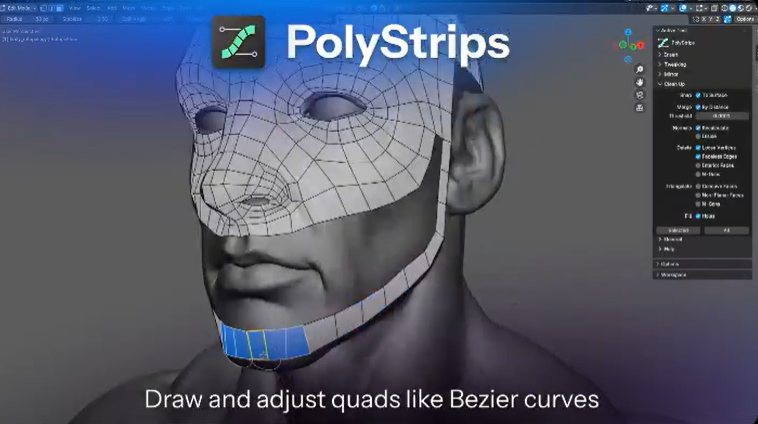
The tools are built around sketching rather than clicking vertices: Contours wraps loops around cylindrical forms by walking the mesh rather than shrink-wrapping (so overlapping fingers work), PolyStrips lets you draw and then bend key loops like Bezier curves, and Strokes fills larger areas by connecting parallel strokes into grids. Everything snaps to the high-poly automatically.
Price: $59.99 one-time, Blender 4.2–5.2. Weakness: it is manual. It makes you faster; it does not do the work for you.
Free Automatic Options
AutoRemesher — free, MIT licensed, standalone with GUI and CLI. Version 1.1 rebuilt its parameterizer and added anisotropic quad sizing. Being MIT means you can use it commercially without concern, and the CLI makes batch processing possible.
Instant Meshes — free, older, but still the most forgiving on badly formed geometry. Interface shows its age.
Blender’s built-in Remesh modifier — free and instant, but voxel-based and topology-blind. Fine for sculpting iterations, not for final assets.
Paid Automatic Options
Quad Remesher — available across most major DCCs, and the quality benchmark for one-click results. ZRemesher — built into ZBrush, excellent, but only worth it if you already own ZBrush.
What About AI Retopology?
Several AI tools are in development — Tractive and CozyBlanket Pro among them — but as of now most are waitlists or closed betas with no public pricing. We covered the full landscape in our AI retopology guide.
The short version: promising, not yet something you can build a pipeline on.
Is RetopoFlow Worth the Money?
If you retopologise characters more than a few times a year, yes. Sixty dollars is roughly one afternoon of freelance time, and RetopoFlow will save considerably more than that on a single character.
If you mostly make props, environments or hard-surface work, save your money — AutoRemesher is free and will handle it. Buying a manual retopology tool for props is solving a problem you do not have.
The Workflow Most Professionals Actually Use
Not one tool, but a sequence:
- Auto-remesh first to get a usable base from the sculpt or scan
- Manually rework only the deformation-critical areas — face, shoulders, elbows, hands
- Leave the rest as generated
That hybrid approach is why the free and paid tools are not really competitors. The automatic tools handle the 80% nobody will scrutinise; the manual tool handles the 20% that decides whether your character survives being animated.
Quick Reference
- Characters, deformation matters — RetopoFlow ($59.99)
- Props, scans, AI meshes, batch work — AutoRemesher (free)
- Messy or degenerate geometry — Instant Meshes (free)
- One-click quality, multiple DCCs — Quad Remesher (paid)
- Already own ZBrush — ZRemesher
More tools in the 3DxDEV Library and our resources directory.
Disclosure: some links on this page are affiliate links. They cost you nothing extra and help support 3DxDEV.

