
You don’t need a multi-camera studio setup, expensive suits, or cloud subscription software to do performance motion capture anymore.
A single video file inside Blender is all it takes.
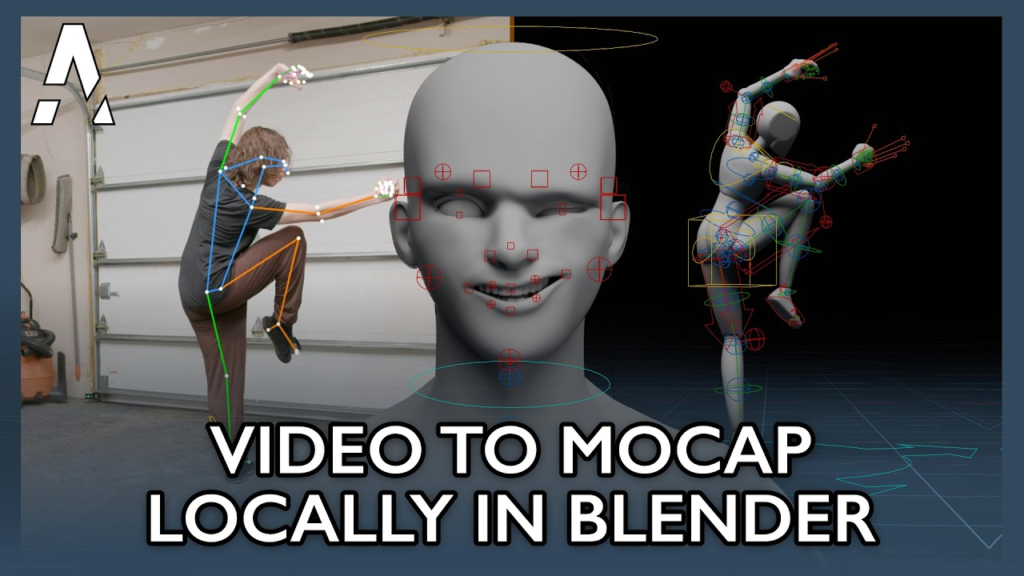
Arcomade just released BlendCap—a 100% local, offline Blender add-on that extracts full-body, hand, and facial tracking directly from video footage.
It maps performance straight onto Rigify, Auto-Rig Pro, Mixamo, or CloudRig setups and includes instant FK-to-IK conversion for fast keyframe cleanup.
For solo animators and indie game devs: would you use video mocap for primary animation, or just for blocking out initial poses?
It requires Blender 4.2+ on Windows/Linux (NVIDIA GPU recommended). Since every capture is saved locally, you can reuse performances on different characters without re-running the tracking!
Why are indie animators talking about turning Blender into a standalone MOCAP studio?
Because BlendCap handles full-body, finger, and facial tracking from a single recorded video clip—completely offline on your own GPU.
It retargets motion directly to Auto-Rig Pro, Rigify, Mixamo, and CloudRig setups without external software.
Have you tried using AI video tracking to speed up character animation keyframing yet?
Debate
“Video-based motion capture can never replace hand-keyed animation or dedicated suit setups.”
Tools like BlendCap are bridging the gap by running tracking locally and providing built-in FK-to-IK conversion tools so artists can quickly clean up tracked curves.
Does single-video mocap save actual production time, or does curve cleanup take as long as hand keyframing?
Story
What started as a personal project by developer Arcomade just turned into a complete performance-capture tool for Blender users.
BlendCap was built to eliminate marker suits, hardware requirements, and cloud subscriptions by bringing video tracking directly into your viewport.
What’s one part of the character animation pipeline you wish was easier to tackle as a solo artist?
Value
If you animate characters in Blender 4.2+, BlendCap is a huge quality-of-life tool for performance capture:
• Full Performance Tracking: Tracks body, hands, and face from 1 video.
• Rig Presets: Built-in retargeting for Rigify, Auto-Rig Pro, Mixamo, & CloudRig.
• 100% Local: Runs offline on your hardware with no monthly subscription.
• Cleanup Tools: Converts FK to IK directly to simplify editing.
Which feature would save you the most time on your current character project?
Remember when setting up facial and body mocap meant dropping thousands of dollars on specialized gear or renting studio space?
Single-video tools like BlendCap are giving indie creators the ability to tell complex, character-driven stories right from their home computers.
Performance motion capture used to mean a multi-camera studio, an expensive suit, or a cloud subscription that uploaded your footage to someone else’s servers. BlendCap removes all three. It is a Blender add-on from Arcomade that extracts full-body, hand, finger and facial tracking from a single ordinary video file, entirely offline, on your own machine, for a one-time payment.
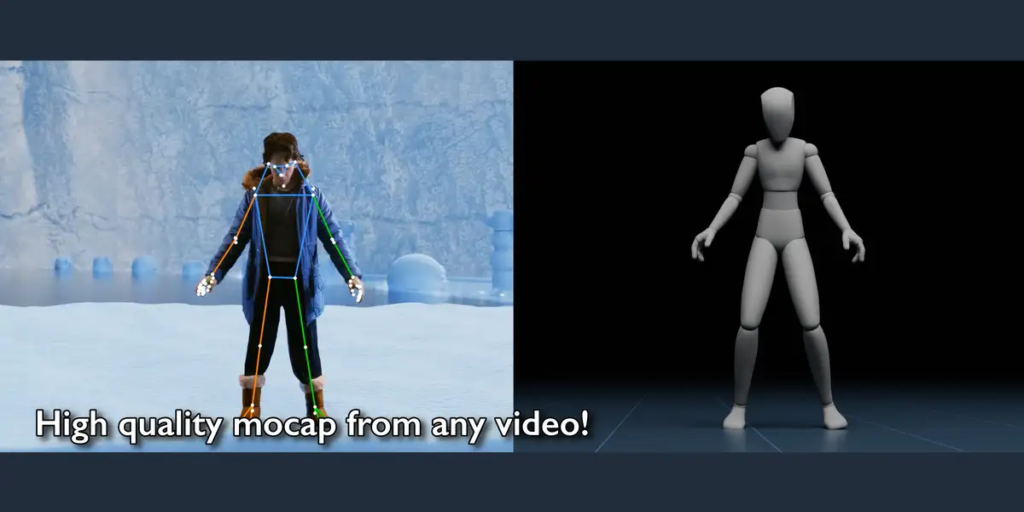
Film on a phone or webcam, drop the clip in, and BlendCap tracks the performance and retargets it onto your rig as standard keyframe animation you can polish like any other.
What BlendCap Actually Does
- Full mocap from one video — Body, face, hands, fingers and world-space movement are tracked together from a single clip. Capture runs at roughly a third of a second per frame depending on hardware.
- Face tracking — Capture the face with the body or separately and mix later. Retarget onto face bones, or drive standard ARKit-style shape keys, with per-region expression strength controls.
- Finger tracking — Both general hand-shape and full finger-pose tracking, with controls for finger curl and the ability to rebuild finger motion from tracked keypoints.
- Retargeting presets — Ships with ready-made maps for Rigify, Auto-Rig Pro, CloudRig and Mixamo, plus a visual bone-map editor for custom rigs. Custom maps save as reusable presets.
- FK to IK conversion — Puts finished motion onto your rig’s IK arm and leg controls so you can adjust the animation immediately.
- Post-processing kit — Foot locking and grounding to kill sliding, depth-noise filtering, body and face smoothing, camera-angle correction for tilted footage, and tracking-failure repair for frames where the subject is briefly lost.
- Reusable capture library — Every capture is saved and can be re-imported onto another character later.
The Offline Point Is the Real Selling Point
Most video mocap in 2026 is cloud-based. You upload footage, their servers process it, you download the result. That is a genuine problem if you work under NDA or with client footage, and it means your pipeline breaks when their service goes down, changes pricing, or shuts down.
BlendCap runs entirely on your machine after a one-time setup. Nothing is uploaded. For freelancers handling client material, that is not a nice-to-have, it is the difference between usable and unusable.
BlendCap vs Other Video Mocap Tools
Here is the honest landscape as of 2026:
- Rokoko Vision — Free tier for single-camera capture, with dual-camera precision on paid plans. Best for testing video mocap without spending anything, but it is cloud-based and the free output quality is limited.
- DeepMotion Animate 3D — Credit-based cloud service, the most proven general-purpose video-to-motion pipeline. Exports FBX, BVH and GLB with optional physics to reduce foot sliding. Ongoing cost scales with usage.
- Plask Motion — Browser-based with a free tier and Pro around 30 dollars a month. Handles multiple people in one video. Good for blocking and previs.
- Move.ai — The quality leader for markerless capture, especially multi-camera. Subscription pricing starts around 99 dollars a month, which puts it out of reach for most solo animators.
- Rokoko Smartsuit Pro II — Inertial suit at roughly 2,500 to 3,000 dollars. Higher fidelity than any camera-only tool, works outdoors, no occlusion. Finger gloves cost 500 to 1,500 more.
- Cascadeur — Not mocap at all, but physics- and AI-assisted keyframing with a free tier. Worth knowing about as an alternative approach to believable motion.
BlendCap’s position is specific: a one-time 60 dollars, offline, and it lives inside Blender rather than shipping you out to a browser and back. Against a 30-dollar-a-month subscription it pays for itself in two months. Against Move.ai it does not match the quality, and it is not trying to.
What It Will Not Do
Single-camera capture has inherent limits, and no add-on changes the physics. Expect depth ambiguity, some jitter, and trouble with fast action, unusual poses and heavy occlusion. BlendCap ships automated fixes for exactly these problems, which is a sign the developer understands them, but you will still be cleaning up.
Practical requirements worth knowing before you buy: Blender 4.2+, Windows or Linux only (no macOS), an NVIDIA GPU strongly recommended, and a one-time download of around 11 GB.
Who Should Buy It
Solo animators and indie game devs who already work in Blender, want to keep footage local, and prefer a one-time purchase over a subscription. If you need 80 animations for a game, video mocap for blocking plus a manual polish pass is genuinely faster than keyframing from scratch.
Skip it if you are on macOS, have no NVIDIA GPU, need broadcast-grade fidelity, or only need mocap once, in which case Rokoko Vision’s free tier will answer your question for nothing.
Developer: Arcomade · Price: 60 USD individual (studio tiers at 250 and 450) · Requires: Blender 4.2+, Windows/Linux, NVIDIA GPU recommended
Looking for free rigging tools to pair with it? See our free Blender rigging and animation add-ons and our guide to Auto-Rig Pro alternatives.