
Three tools shipped recently that look unrelated: a GPU particle system, a browser texture painter, and an MIT-licensed remesher. They are all solving the same problem from different directions — and it is not the problem their marketing describes.
The Real Constraint Is Iteration, Not Capability
Hobbyist and indie 3D rarely fails because someone lacked a feature. It fails because the feedback loop was too slow to learn from.
When a particle test takes twenty minutes, you stop experimenting. You commit to your first idea because you cannot afford a second. When retopology takes an afternoon, you avoid sculpting things that will need it. When texturing requires a workstation and a subscription, you never start.
Effects, topology and materials all get good the same way — through attempts. Anything that makes attempts expensive caps your ceiling regardless of your skill.
GPU Simulation: From Waiting to Directing
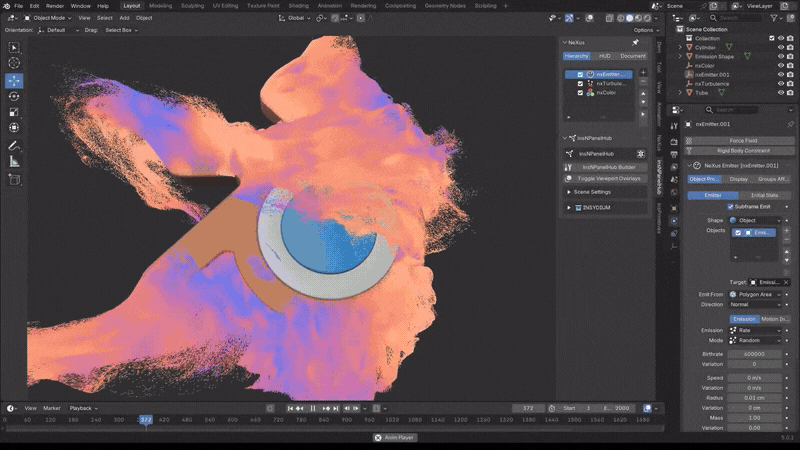
NeXus for Blender runs particles, fluids, fire and grains on the GPU with real-time viewport feedback, using a Vulkan-based engine that works on NVIDIA, AMD and Intel hardware rather than being CUDA-locked.
The speed is not the point. The interactivity is. Art directing a simulation while it runs is a different activity to submitting a job and hoping.
One correction, since older posts still circulate: the free public beta has ended and NeXus is now a paid perpetual licence. For the free route, Blender 5.2 moved physics into Geometry Nodes with an XPBD solver, which is the same idea arriving from the open-source side.
Retopology: From Planned Task to Non-Event
AutoRemesher went MIT-licensed at version 1.0 and has continued developing since.
MIT matters here specifically: you can use it commercially, modify it, and build it into your own pipeline without asking anyone. The author reimplemented dependencies to make that possible, which is a deliberate choice rather than an accident of licensing.
The honest limitation stands though — auto-remeshers are excellent on dense scans and sculpts, and still weaker than a human on hard-surface parts where edge flow has to follow a design intent the mesh does not contain. Our retopology comparison covers when each approach wins.
Texturing: From Workstation to Browser Tab
Mixos does PBR painting, material compositing and mesh-map baking in a browser, on WebGPU. No install, no large download.
The AI generation gets the attention. The more significant thing is that “you need a powerful computer and a subscription to texture properly” quietly stopped being true.
Worth knowing the free tier caps export at 512px with a watermark — fine for learning, not for shipping.
What These Have in Common
Each removes a waiting cost rather than adding a capability:
- GPU simulation removes the wait between idea and result
- Free MIT retopology removes the wait — and the licence negotiation — between sculpt and usable asset
- Browser texturing removes the wait between wanting to try and being set up to try
The gap between hobbyist and studio tooling keeps closing, and it is mostly happening through releases like these rather than through headline features.
The Part That Has Not Changed
Faster iteration raises your ceiling. It does not supply judgement.
A GPU solver will let you try fifty versions of an effect; deciding which one reads correctly is still yours. An auto-remesher gives you quads; deciding where loops must sit for deformation is still yours. Browser texturing gives you maps; roughness variation is still what separates convincing materials from flat ones.
Tools remove friction. They have never removed taste, and the artists getting the most out of these releases are the ones who already knew what they were aiming at.
More free tooling in the 3DxDEV Library and our resources directory.

