
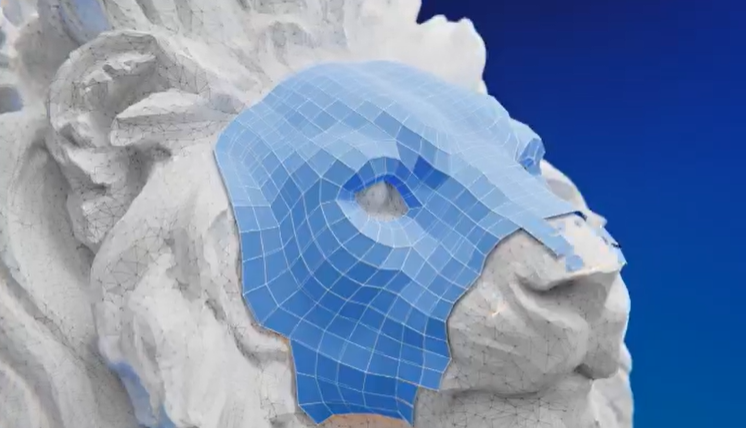
RetopoFlow is the long-standing standard for manual retopology in Blender. Where auto-remeshers try to solve topology for you, RetopoFlow makes drawing it by hand fast enough that you stop resenting the job. It has been in development since 2013, and version 4 is a complete rewrite.
What Changed in Version 4
The headline is that RetopoFlow 4 integrates directly into Blender’s Edit Mode rather than running as a separate mode you enter and exit. Earlier versions took over the viewport, which meant a context switch every time you wanted a normal Blender operation.
Version 4 also brings a significant performance improvement, which matters more than it sounds — retopology means working against a multi-million-poly sculpt, and lag is what turns a focused session into a frustrating one.
The Tools
- Contours — Ctrl and drag to wrap a loop around any cylindrical form. It walks the loop around the mesh rather than shrink-wrapping, which is why it handles overlapping fingers correctly where simpler tools fail.
- PolyStrips — Sketch out your key loops as strips. Start or stop over existing geometry and it bridges automatically. Brush size sets polygon size, and you can add or remove segments by scrolling. Strips can also be manipulated afterwards like a Bezier curve, with proportional editing support.
- Strokes — Draw a line to place a row of edges; draw a roughly parallel stroke near a selection and it connects the two into a grid. This is the workhorse for filling larger areas.
- PolyPen, Patches, Loops, Tweak and Relax — the precision and cleanup layer for individual verts, holes and spacing.
Everything snaps to the high-poly surface automatically, and evenly spaced quads are the default behaviour rather than something you fight for. It is noticeably better with a tablet.
Who It Is For
Character artists, and anyone retopologising sculpts or scans where edge flow decides whether the model deforms correctly. Automatic remeshers still cannot reliably place loops around a mouth, an eye or a shoulder the way a human decides they should sit.
If you retopologise props, hard-surface or background assets, a free auto-remesher may genuinely be enough. RetopoFlow earns its price on characters.
Price and Requirements
$59.99, one-time — no subscription. Supports Blender 4.2 through 5.2. It currently holds 55 ratings on Superhive, and the developer, Orange Turbine, is a Corporate Gold sponsor of the Blender Development Fund, so a share of the purchase supports Blender itself.
Honest Caveats
This is a manual tool. It will not retopologise a model while you make coffee — it makes you faster, it does not replace you. If you were hoping for one-click automation, look at AutoRemesher (free) or Quad Remesher instead.
Version 4 being a full rewrite also means workflows differ from RetopoFlow 3, so existing users should expect some relearning.
Developer: Orange Turbine · Price: $59.99 one-time · Requires: Blender 4.2–5.2
Comparing options? See our guide to AI retopology tools in 2026.