
Blockbench is a free, open-source 3D model editor built specifically for low-poly and boxy models. It runs in a browser or as a desktop app, and it is the standard tool for Minecraft modelling — though its use has spread well beyond that.
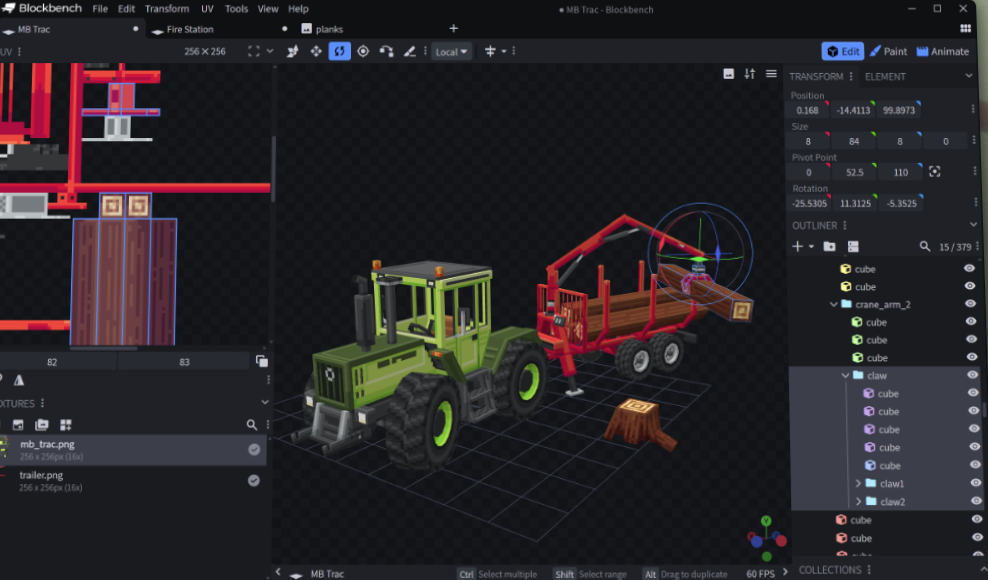
Why a Dedicated Low-Poly Editor Exists
You can model a cube in Blender. But Blender is a general-purpose application with hundreds of tools, and low-poly box modelling needs about six of them.
Blockbench strips the interface down to exactly that. Adding, scaling and positioning boxes, assigning texture faces, and pixel-painting directly onto the model — with no modifier stack, no shader graph, no simulation systems in the way.
For the style it targets, that constraint is a feature. New users are productive in minutes rather than weeks.
What It Does
- Box and low-poly modelling with a purpose-built interface
- Integrated pixel texture painting — paint directly on the model, no external editor round-trip
- Keyframe animation with a timeline
- Browser and desktop versions — nothing to install if you do not want to
- A plugin ecosystem extending formats and workflows
- Multiple export formats, including standard interchange formats for game engines
Beyond Minecraft
Its Minecraft roots are why it exists, but the low-poly boxy aesthetic is a legitimate style in its own right — indie games, voxel-adjacent art and stylised mobile work all use it. Anything you build exports to standard formats and drops into Unity, Godot or Unreal.
Where It Stops
Organic forms. There is no sculpting, no subdivision workflow, no serious UV unwrapping. A character with flowing hair or a creature with musculature is the wrong job for this tool — that is Blender sculpting territory.
Use it for what it is: the fastest path from idea to textured low-poly asset.
Creator: JannisX11 · Price: Free / open source · Platform: Browser and desktop
See our Minecraft modelling guide and our low poly art style guide for getting the look right.